But, what is ai-eval-lab even?
A brief intro of ai-eval-lab: a platform that streams desktop applications from a docker container (like KiCad) to the browser via VNC, captures real-time board state telemetry, and evaluates the student's process using LLMs.
But first, here is how the idea started...
How the idea came about
I was being assigned UI work at my day job for quite some time now and was getting bored and wanted to build something. One of the things that came to my mind was a platform I had recently used from an AI company who were building RL environments, basically clones of popular apps such as Linear, Jira, Zendesk and then used to train AI models on them.
The concept of streaming an app and recording the user's interactions be it the mouse or keyboard events, or actions performed inside the app, everything was being captured in a timed sequential manner.
This was one of the thoughts in my mind, another was - I was actively applying for jobs and giving tests almost twice or thrice every week, normal DSA-based OAs. And thought of this - what about other engineers, like those from domains like electrical, mechanical etc.
Back in college time, I remember giving timed assessments every weekend for coding+aptitude tests but nothing as such was conducted for the students from other engg domains. And here I saw an eventual possibility to built something. The streaming part was almost sorted (atleast in my mind) what remained was to find an app which I will stream.
I remembered using Tinkercad, a CAD software in my IOT classes during college time and thought of if I could host it and provide a test-like environment. Turns out Tinkercad and my somewhat familiar experience in electrical simulations is owned by a small private company called Autodesk. And I had to drop my plans here of integrating Tinkercad and went over to Claude and discussed a few other possible alternatives. That's where KiCad came into the picture. Its a full electronics CAD software which is also open source. I quickly installed KiCad on my macbook and opened it, and the interface was quite intimidating for someone who was used to using Vs Code for a living. Navigated through it and learnt few basic concepts like Footprints, Zones, etc.
Okay, the app is working now, what next? A custom telemetry plugin to track the board state over time as the user performs activities. With Claude, I came across the scripting console and python module called pcbnew, now I tested the theory of telemetry with a simple script
import pcbnew
board = pcbnew.GetBoard()

def getFootprints(board):
	for fp in board.GetFootprints():
		print(fp.GetReference())
		print(fp.GetFPID().GetLibItemName())

getFootprints(board)
and ran it, and voilaaaaaa - no outputs. obviously, because i haven't placed anything yet.
i go to Place > Place Footprints > searched for "LED" > selected one and placed it. 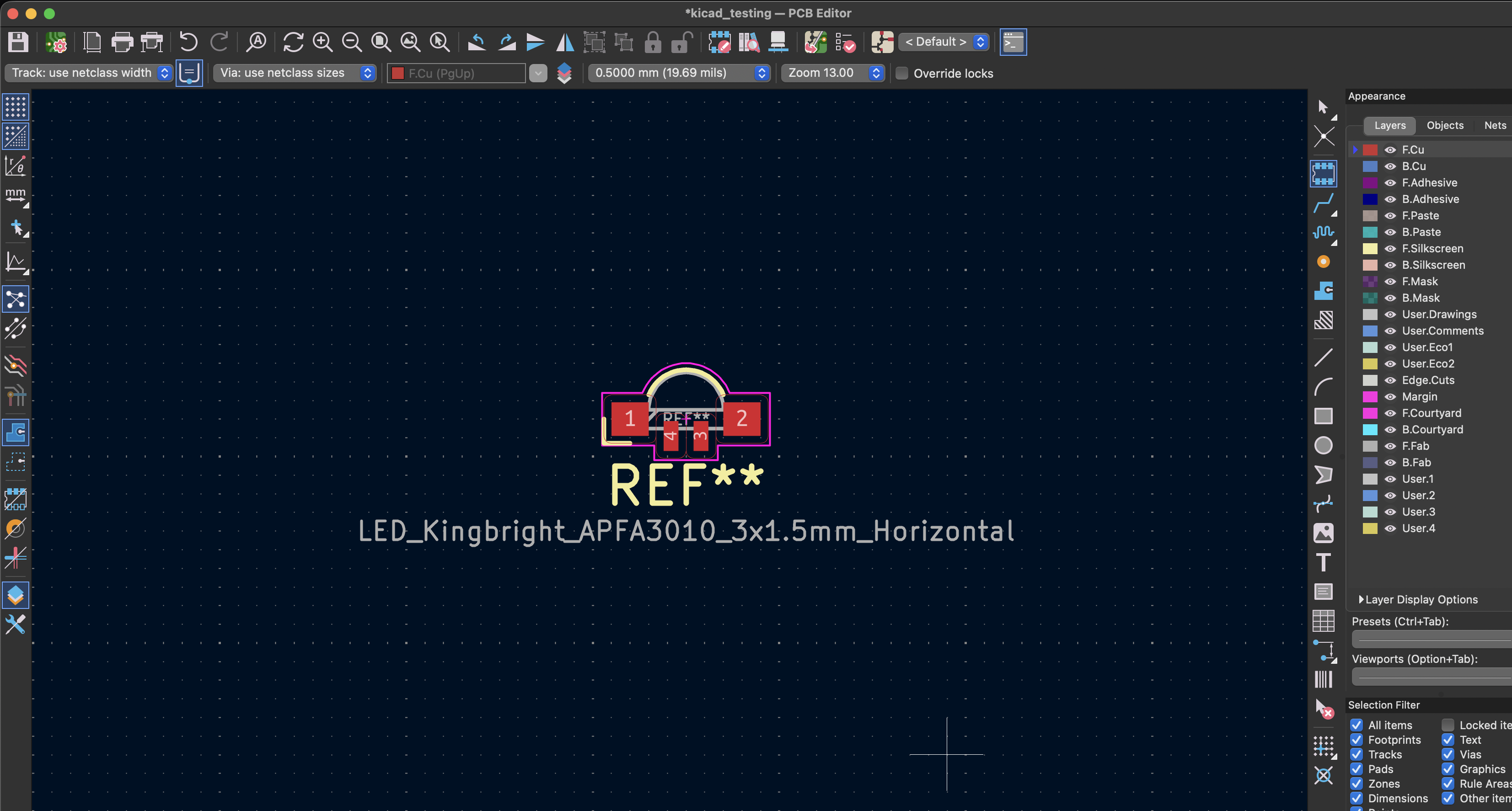
now again, i went to the scripting console and ran the same python code,
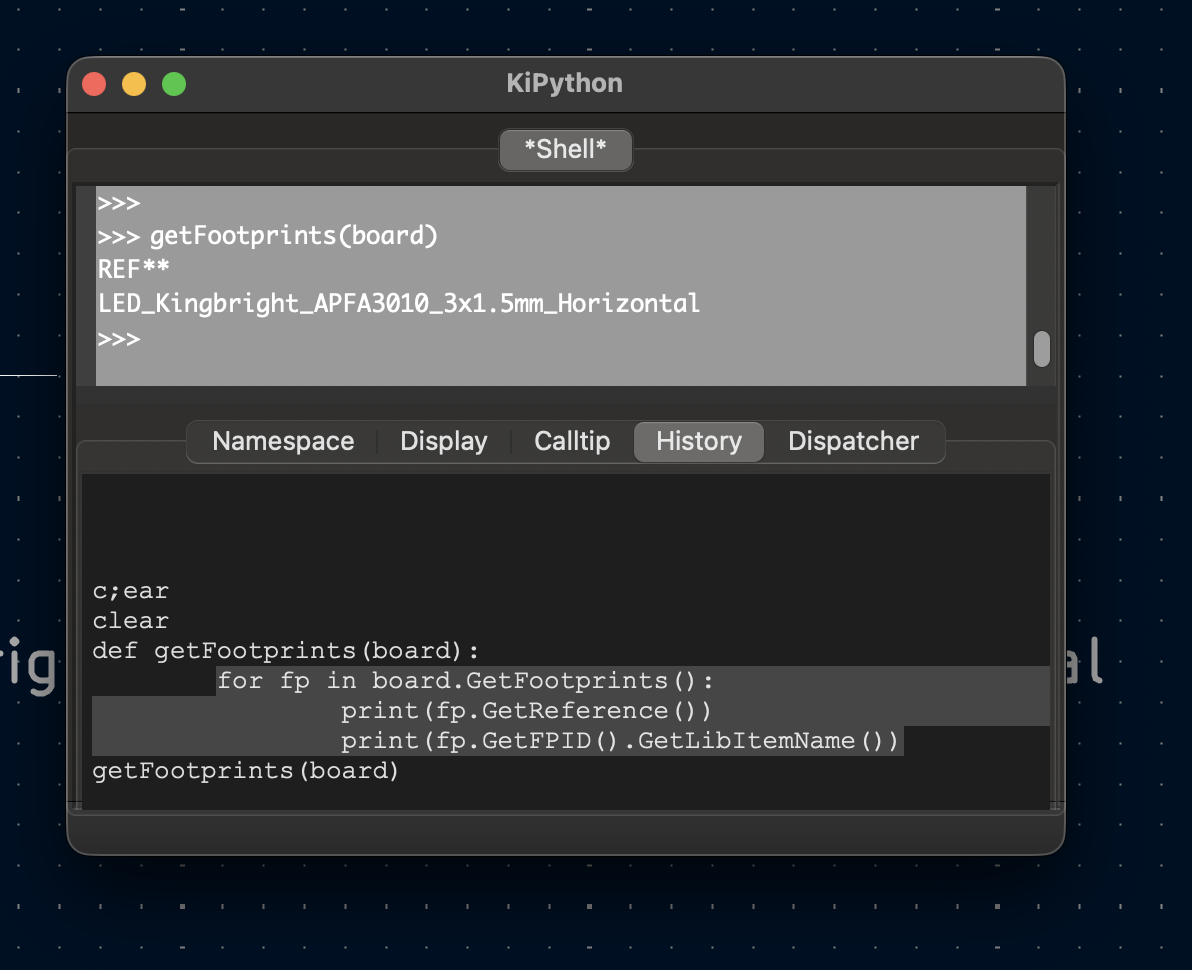
and it displayed the one i had just placed.
I checked with Claude if I could fetched the entirety of the board state i.e all the things placed on the board using pcbnew module, and turns out, I can.
That was enough POC needed for me to start building the actual app.
But before that, since I was planning on testing out Claude code as well (i wasnt using any agentic coding tool since then) so I thought it would be wiser for me to just draw a high level diagram of the app and learning the things on the way while researching about it, instead of just completely black-boxing the working of the app using Claude.
I hopped onto excalidraw and took my sweet time and came out with this -
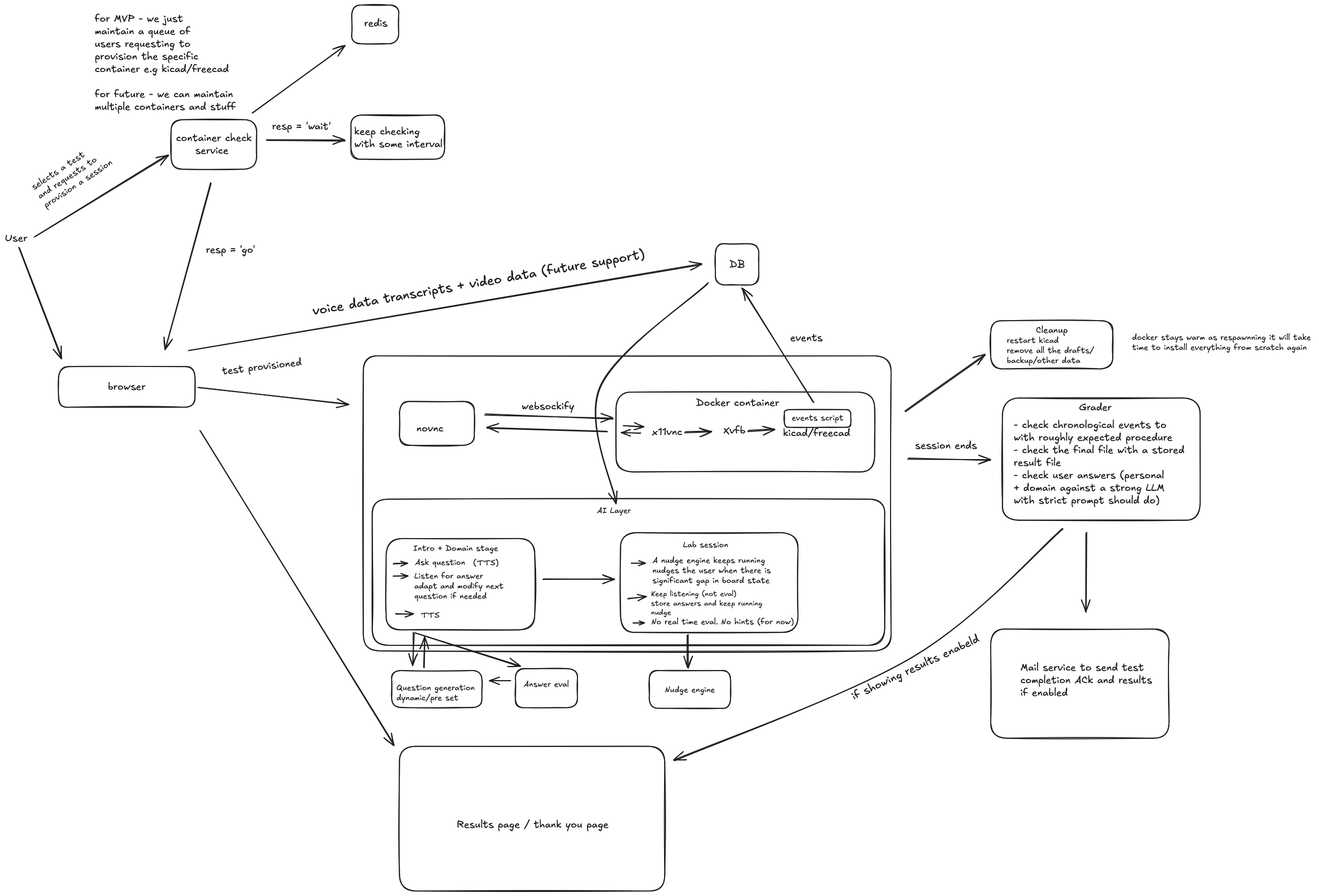 Later on I learnt more about system design and came to know that there are many mistakes in the above diagram. (I am improving on my skills to think about systems and draw better HLDs)
From the diagram and the concept I had, few important things were obvious -
- A redis based queueing mechanism as I could only create X amount of KiCad containers at any given time, others would have to wait in a queue until a container becomes free
- A websocket connection to connect the noVNC iframe inside the browser with the VNC (xvnc) stream of the X11 virtual frame buffer (xvfb) which was holding all the pixels of KiCad in memory as browsers dont allow raw TCP connections (which VNC does by default). So I had to use websockify to kind of build a pipe between the noVNC iframe and xvnc to transmit the raw TCP data)
- An interviewer/probing system to ask questions to the user throughout the three stages i.e Intro phase (basic questions about the user and their background), Domain phase (specific conceptual questions based on the assessment), Lab evaluation (asking questions during the lab phase, like what steps have you taken till now, what steps remain etc)
- A heartbeat based mechanism to check if the user is still in the session or not, if not then clear the container for other users
- A Grader system which will take all the data points like the QnA pairs from all the phases + the board snapshots that were sent throughout the period of Lab evaluation and then combine all of these and prepare a prompt to send to the LLM
- for proctoring? I came to the conclusion that there are many websites and libraries which already provide proctoring support out of the box, so I wont re-invent the wheel here and will actually not include this for the MVP.
Then came the important questions of tech stack- what to use? I am a junior dev and still not mature enough to completely embody the fact that tech stacks, languages dont matter as much, systems and understandings do and still get excited at the idea of using a new language for my app, a new DB, a new Auth system, a completely new tech stack.
Initially I wanted to use Go, as I wanted to learn the language from a very long time. But here is the thing, if I am going to use Claude to build this - using Go wont matter because, I wont be the one writing it or for that matter understanding anything about Go at all.
Finally, considering the fact that, most of my time I will spend on thinking about how things will work instead of actually worrying about the individual parts like the server, the frontend etc, since its a small app, I thought I will go with Nextjs as both the front and the backend for the app. Again.
Starting out: Laying the building blocks - Intro and Domain Phase
So I asked claude code to scaffold the project and oh boy it did good.
Then came the actual building phase where I had to get hands-on and start building each phase, starting out with the intro phase.
This phase and the domain phase are very simple actually, they didnt need much attention.
When the user started an assessment, the system would generate an assessment id which would be stored from then on to store everything for that session. The Intro and Domain just had to do this - Ask the user a question, take the response and then send the data over to the server, the server runs STT on the user's voice data and then it is stored in DB as a QnA pair with the specific assessment id.
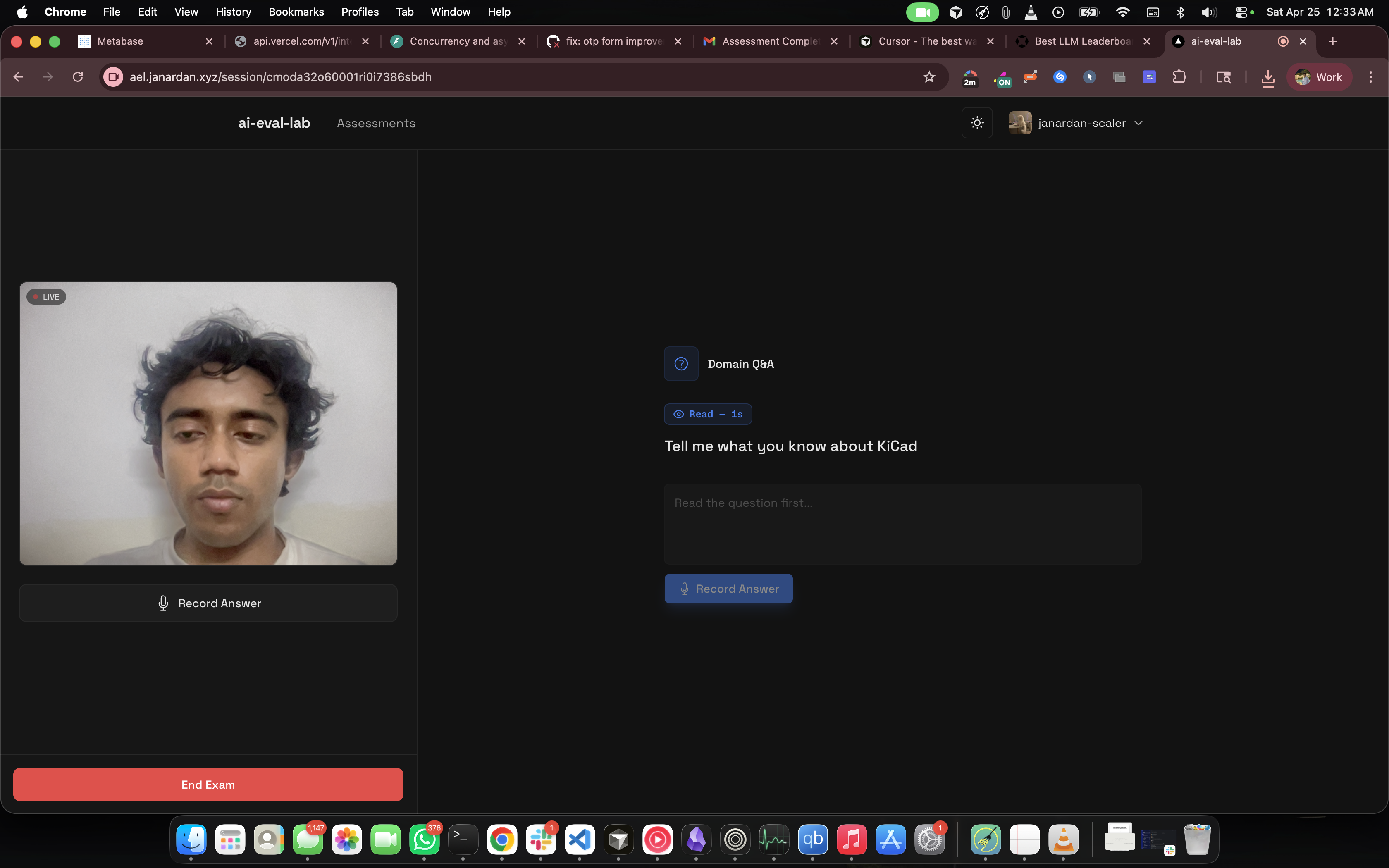
Here came the questions of what STT and TTS to use, STT for the user's response and TTS to ask the user a question. I had used Elevenlabs before, so I thought of that, but the pricing was a bit too much and I thought I would get a significant bill just building the app.
Had some free gemini credits so I thought I will use them for both STT and TTS.
So i went with Gemini. The free credits were generous enough for development and honestly, the quality was decent, not ElevenLabs-level emotive, but for a proctoring voice asking "what's your name" and circuit theory questions, it worked fine. STT was accurate too
Now came the Lab phase, the entire reason this app exists. And oh boy, was I in for a ride.
The Lab Evaluation Phase
Lab is where KiCad had to actually run, stream, and send its state.
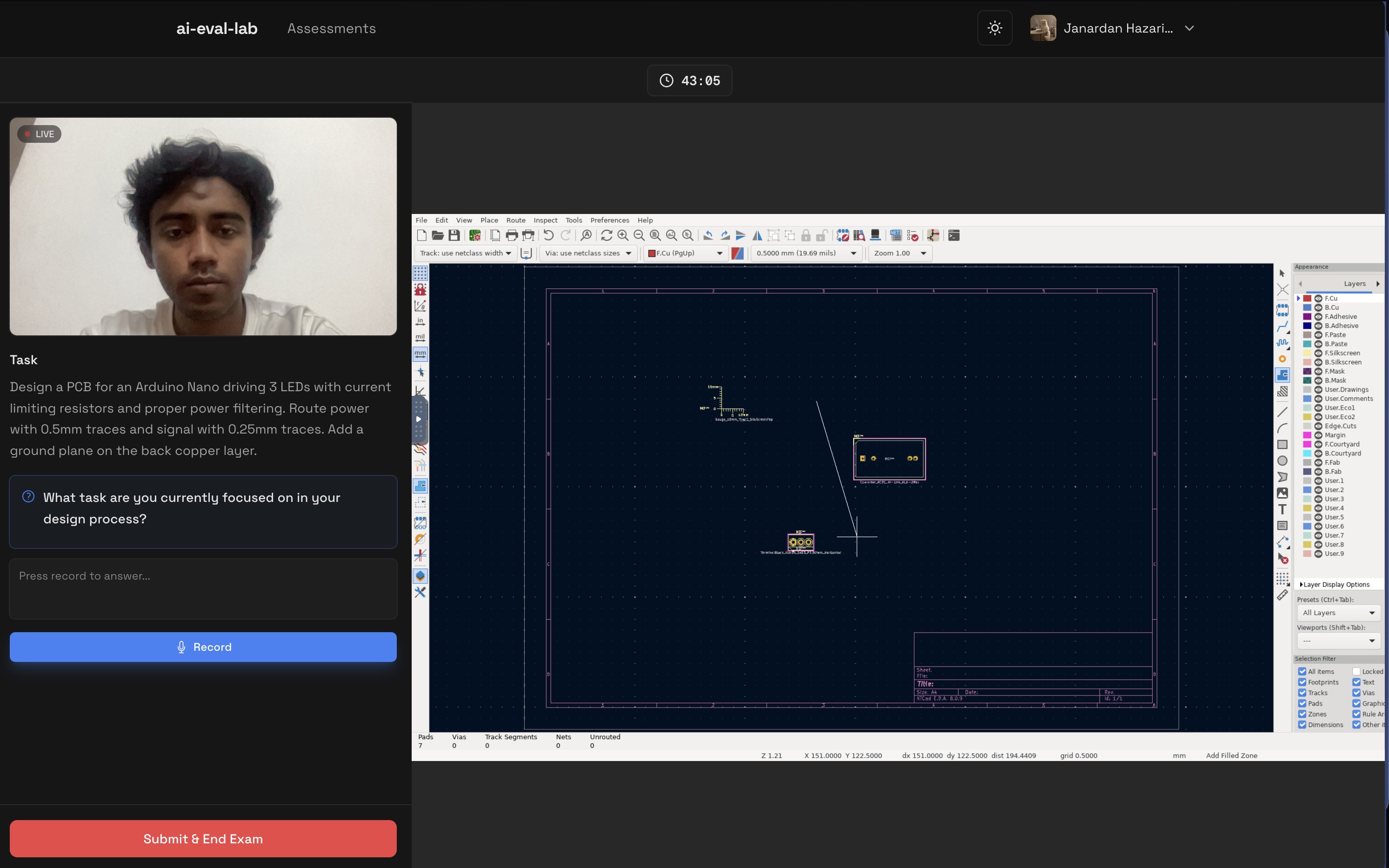
Docker + GUI Apps
Docker containers don't have displays. But KiCad needs a display, it's a GUI app. That's where Xvfb (X Virtual Framebuffer) comes in. It creates a virtual display in memory that X11 apps can render to.
So the container setup became:
- Xvfb running on
:99(a virtual display) - KiCad launched pointing to that display
- x11vnc (a VNC server) reading from that display and serving it over TCP
- websockify sitting between the raw TCP VNC and WebSocket, because browsers won't do raw TCP
The Dockerfile was messy. I had to install KiCad, all its dependencies, Python (for the telemetry script), xvfb, x11vnc, and get them to start in the right order. I lost count of how many times the container would start but KiCad wouldn't appear, or VNC would connect to a black screen or just time out (caddy issues 😤).
the bash script to get the container to start streaming:
Xvfb :99 -screen 0 1920x1080x24 &
sleep 1
openbox &
sleep 1
x11vnc -display :99 -nopw -forever -shared -rfbport 5900 &
sleep 1
websockify --web /usr/share/novnc 6080 localhost:5900 &
sleep 1
pcbnew &
(Note the 1920x1080x24. Dropping to 16-bit color depth was one of the critical VNC snappiness QoL improvements I had to make later on, as 24-bit raw frames were 6.2MB and extremely laggy over cheap VPS bandwidth! but 16 bit didnt result in any improvement at all so I went back to 24 bit)
The Telemetry python plugin
Remember that pcbnew script from earlier? I had to run that inside the container, against the running KiCad instance, and send the output to my Next.js backend.
I built a kicad_poller.py daemon that:
- Ran an infinite
poll_loopinside the container. - Hooked into
pcbnew.GetBoard()to grab footprints, tracks, and zones. - Hashed the JSON board state, and only
POSTed to my backend if the state actually changed - Handled internal Docker networking by pointing the
BACKEND_URLstraight back to my Next.js API.
noVNC: streaming the app inside browser
I embedded noVNC in an iframe. It's a pure HTML5 VNC client, connects via WebSocket and renders the desktop (container) in canvas.
Mouse clicks and keyboard events needed to actually control KiCad inside the container. At first, from India to my us-east-1 server, the interaction was sluggish. Aside from dropping the color depth, I had to tune the noVNC client params (compression, quality) and adjust x11vnc's encoding to make panning and zooming in KiCad bearable (still quite sluggish).
The >1 session problem
Reality hit when I tried to run 2 concurrent sessions. My initial architecture was static: docker.ts always bound the container to host port 6080, and my Caddy reverse proxy mapped one static domain to that port.
When session #2 tried to spin up, Docker rejected it because port 6080 was already held by container #1.
To fix this, I had to completely change the deployment architecture:
- Dynamic Port Binding: Docker assigns a random free host port to each new KiCad container.
- Dynamic Subdomains: Each session gets its own subdomain (e.g.,
s-12345.vnc.domain.com). (godaddy wild card mapping*.vnc.aelinstead of justvnc.ael) - Caddy Admin API: Whenever a new session starts, my Next.js backend dynamically calls the Caddy Admin REST API to inject a new routing block connecting that unique subdomain to the random Docker host port. When the session ends, it calls the API to delete the route.
This rabbit hole ran too deep to be honest and took me lots of time and effort and debugging through docker logs of different containers to finally uncover all the aspects and realiably stream multiple containers at any given time. I can write a whole article about the debugging i had to do to find all the edge cases and the fixes applied. Keeping it short for now.
(ps. ignore me and my lighting condition, i was just hapy that finally multiple sessions were working)
The Grader: LLM Evaluation
This was actually the easy part. After all three phases, I had:
- Q&A from Intro (background)
- Q&A from Domain (theory knowledge)
- Q&A from Lab (probing questions like "what did you just place?")
- Board snapshots throughout the Lab (structured JSON from pcbnew)
I wrote a prompt assembler that would:
- Format all Q&A pairs.
- Map the board state snapshots to a chronological timeline (e.g.
T=2:30 → 5 footprints, 10 tracks). - Add a lab-specific rubric: "Evaluate process, not just final output. Did they plan? Did they iterate? Did they understand their mistakes?"
Sent it to Gemini 2.5 Flash via API. The response was a structured JSON evaluation with:
- Verdict (
strong hire,hire,neutral,reject,strong reject) - Checkpoint scores
- Timeline analysis
- Overall report
Admin Panel: basic CRUD
I needed a way to manage all this. So built a simple admin panel, It's mostly just standard CRUD but it was essential for making the assessment dynamic.
The admin dashboard handles:
- Assessment Management: Creating new assessments, defining the KiCad files, and setting up the rubrics.
- AI Content Gen: I added buttons to auto-generate the probing questions and pre-render the Gemini TTS audio so the student doesn't hit latency during the test.
- The "Regrade" Button: Critical for when the LLM grader fails. I can manually trigger a regrade or override a verdict if the telemetry capture was slightly off.
- Telemetry Deep-Dive: I can actually see the raw snapshots and Q&A pairs for every student session to verify why the AI gave a certain score.
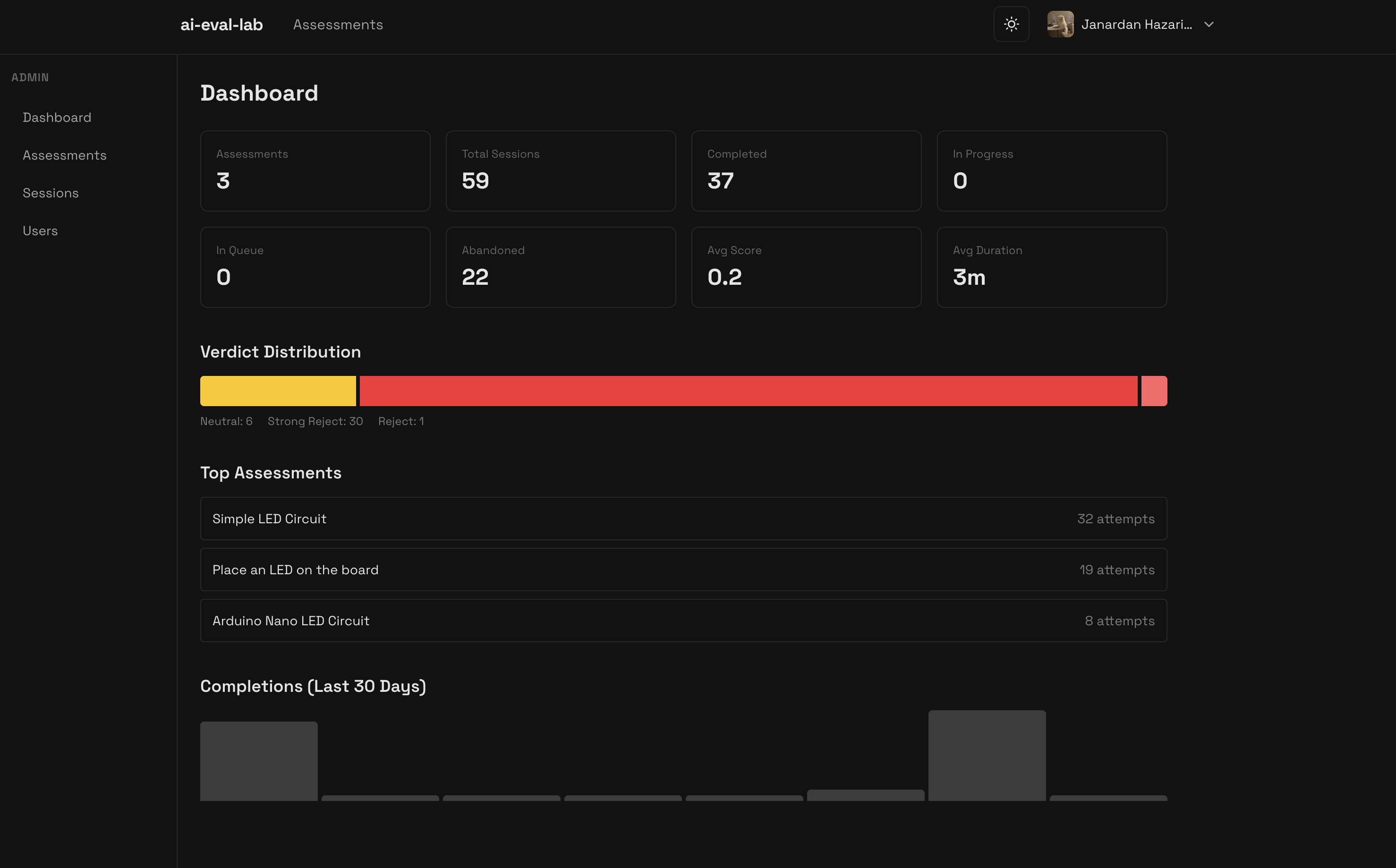
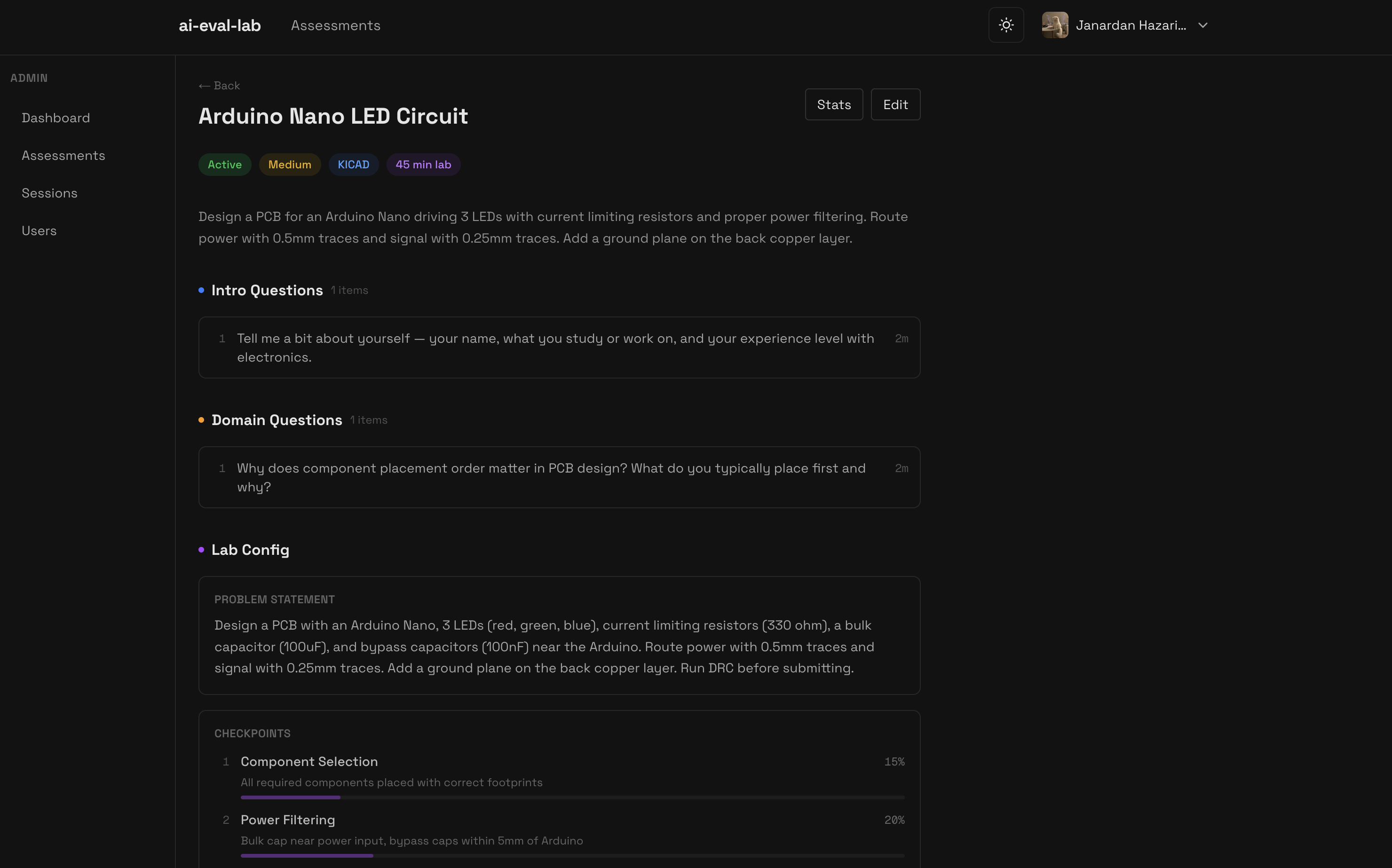
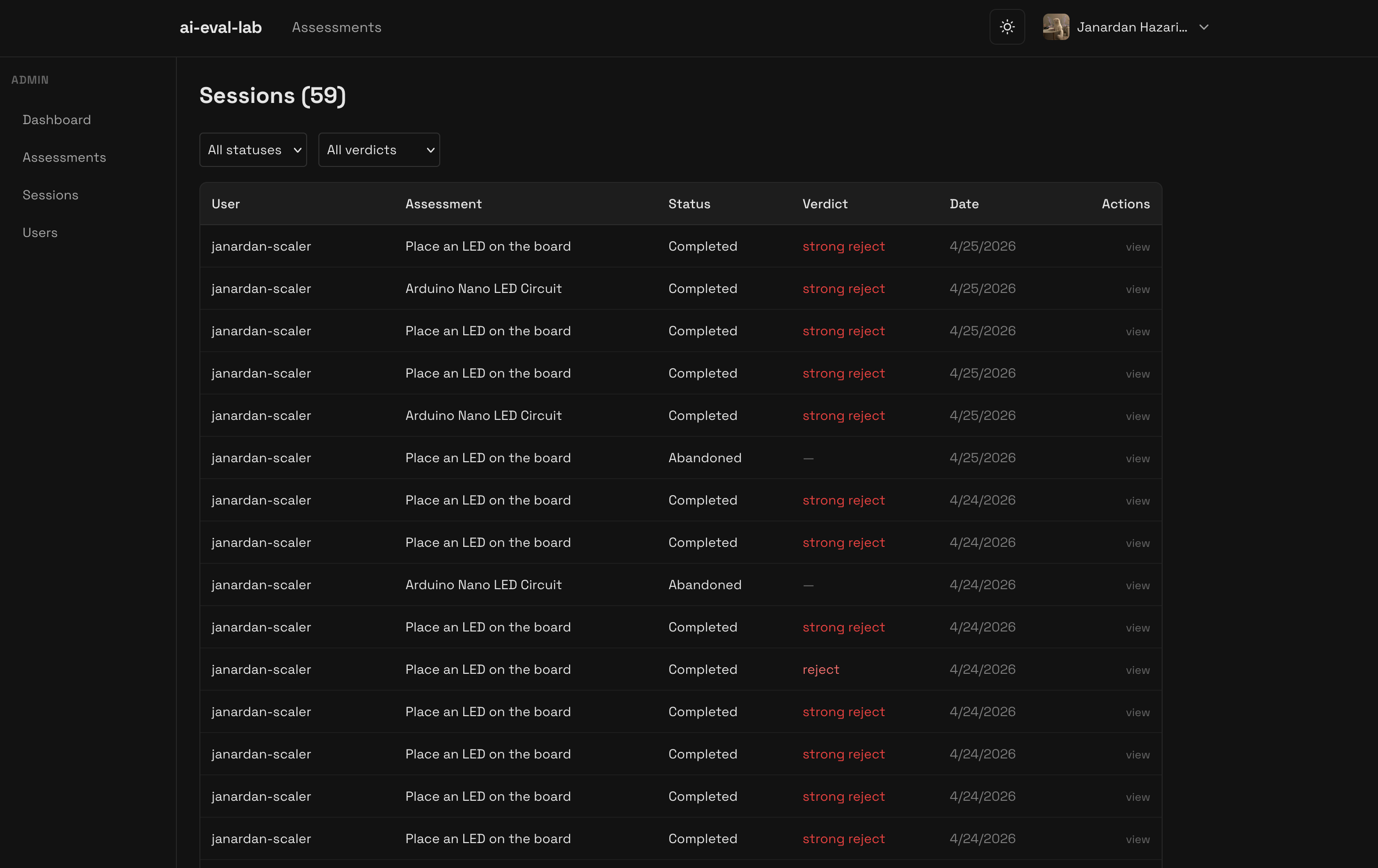 (yeah i kinda suck at pcb design)
Deployment: EC2, Docker
I deployed the app on an AWS EC2 instance. Specifically, an m7i-flex.large (2 vCPU, 8 GB RAM) running Ubuntu.
One server runs:
- Next.js app (Docker)
- PostgreSQL (Docker)
- Redis (Docker)
- KiCad container manager, my Next.js backend dynamically does spawning/killing Docker containers via the
dockerodelibrary. - Caddy as reverse proxy with automatic SSL and dynamic routing API.
The deployment command is standard Docker Compose:
docker compose -f docker-compose.prod.yml up -d --build
What Worked, What Didn't
Worked:
- The telemetry using
pcbnewis powerful, you can extract everything. - Gemini for STT/TTS and Grading is actually very good. The voice needs some tweaking in my app, sounds very, unfriendly and robotic as of now I will say but the STT is very accurate.
- Next.js monorepo, moved fast, no context switching between FE/BE languages.
- Dynamic Caddy Routing - I used caddy for the first time. Didnt knew anything at all about it, so had to read about it and how it worked and used claude for most of the caddy heavylifting such as dynamic container subdomains and on-demand certificate generation.
Didn't / Needs Work:
-
Performance: 1080p VNC stream over cheap ec2 bandwidth is still choppy despite 16-bit optimizations. It supports 3 sessions but needs proper engineering here for smooth streaming and interactions. Bounded by ec2 RAM and cpu cores. KiCad uses about 1GB while the app is running and when someone is using the app, the cpu usage hits 70-80% consistently. Tried moving to
c7i.xlarge(4 vCPUs) but didnt improve much. -
Proctoring: Skipped it for MVP.
Final Thoughts
Building this taught me that how to think things through rather than just auto piloting everything with AI and lots of debugging.
I wanted to use Go, FastAPI, and other cool stuff. But what mattered was understanding how X11 displays work, how VNC protocols work, how dynamic reverse-proxy routing solves concurrent port collisions, and how to actually deploy this and debug it when hitting a connection timed out issue (noVNC to kicad docker connection issues)
Also: AI Coding is scary good. I learned a lot by pair-programming with Claude. But I had to stay hands-on like when I let it auto-pilot, I didn't understand the Docker networking stack (like the host.docker.internal poller bug), and debugging became impossible. Had to step back once, read about the things and then try to make sense again.
Will I try to sell this as a hiring/testing solution? Not yet. It needs proctoring, better infra, more rigorous grading rubrics. But as a proof of concept for "can we evaluate engineers by watching them work"? Yeah. It works.
Try the app: ai-eval-lab